Workflow Templates
Ready-to-use n8n workflows built by automation experts. Download, import, and start automating.
Ready-to-use n8n workflows built by automation experts. Download, import, and start automating.
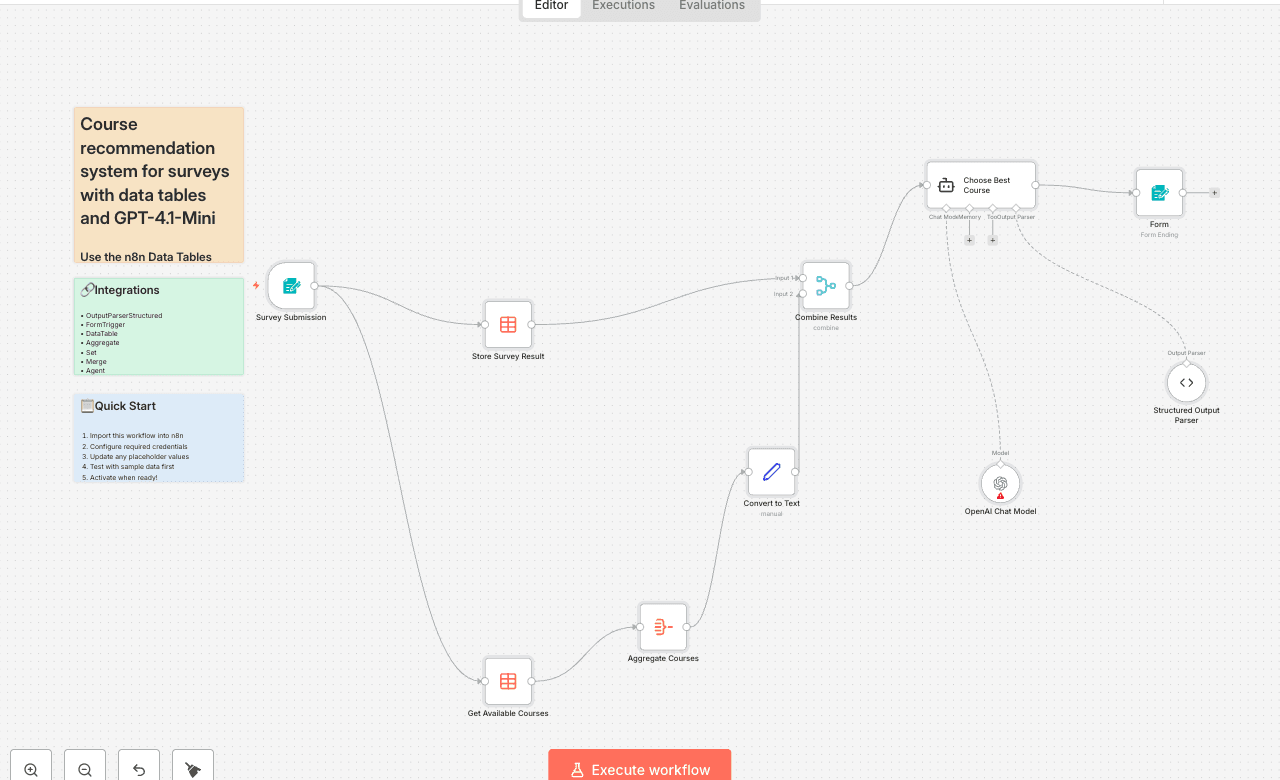
Use the n8n Data Tables feature to store, retrieve, and analyze survey results — then let OpenAI automatically recommend the most relevant course for each respondent.
🧠 What this workflow does This workflow demonstrates how to use n8n’s built-in Data Tables to create an internal recommendation system powered by AI.
It:
> Trigger: Form submission (manual or public link)
👥 Who it’s for Perfect for educators, training managers, or anyone wanting to use n8n Data Tables as a lightweight internal database — ideal for AI-driven recommendations, onboarding workflows, or content personalization.
⚙️ How to set it up 1️⃣ Create your n8n Data Tables This workflow uses two Data Tables — both created directly inside n8n.
🧾 Table 1: Survey Responses Columns:
To create:
📚 Table 2: Courses Columns:
To create:
This Courses Data Table is where you’ll store all available learning paths or programs for the AI to compare against survey inputs.
2️⃣ Connect OpenAI
🧩 Key Nodes Used
| Node | Purpose | n8n Feature |
|---|---|---|
| Form Trigger | Collect survey responses | Forms |
| Data Table (Upsert) | Stores results in Survey Responses | Data Tables |
| Data Table (Get) | Retrieves Courses | Data Tables |
| Aggregate + Set | Combines and formats table data | Core nodes |
| OpenAI Chat Model (LangChain Agent) | Analyzes responses and courses | AI |
| Structured Output Parser | Returns structured JSON output | LangChain |
💡 Tips for customization
🧾 Why Data Tables? This workflow shows how n8n’s Data Tables can act as your internal database:
All user data and course content are stored securely and natively in n8n Cloud or Self-Hosted environments.
📬 Contact Need help customizing this (e.g., expanding Data Tables, connecting multiple surveys, or automating follow-ups)?